Get in touch
Want to work on something together?
Just want to chat? Hit me up.
Want to work on something together?
Just want to chat? Hit me up.
You click a button. A spinner shows up. JSON comes back. Done.
Except it is not done. Between "click" and "200 OK" there is a whole chain of systems that have to agree, in order, or your request never arrives. This post follows a request from the browser through DNS, TCP, TLS, a load balancer, a reverse proxy, your application, and the database, then back out as a response.
Not every product has every box (some skip a separate reverse proxy, some talk to more than one database), but this is the shape you will keep meeting in production.
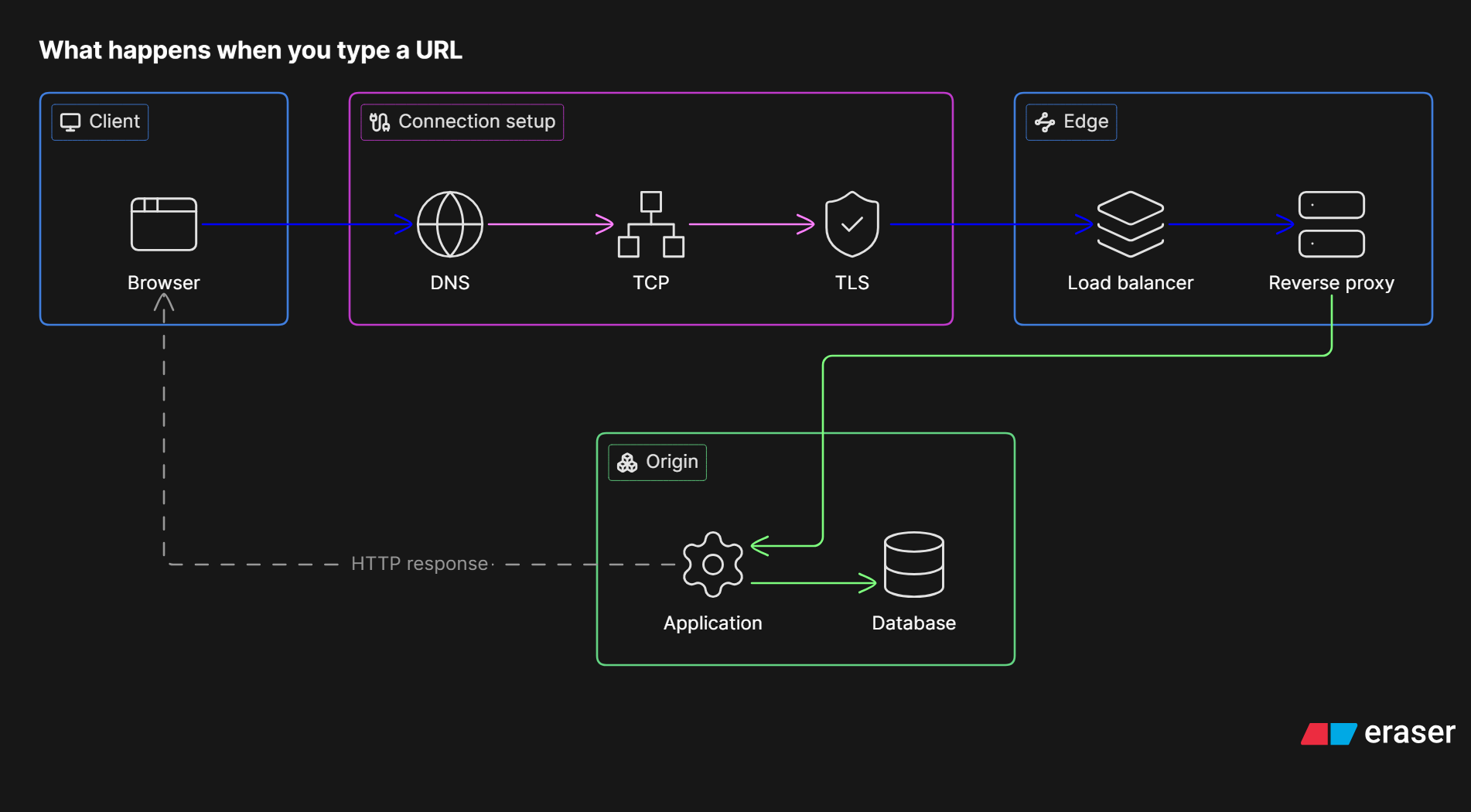
What happens when you type a URL. Response returns through the same edge and connection.
It starts in the client. The browser (or mobile app, or curl, or another service) builds an HTTP request: method, URL, headers, maybe a body.
A few things happen before anything leaves your machine:
https), host (api.example.com), path (/orders), query string (?page=2).Authorization tokens, CSRF headers. The browser attaches what the site previously set, under cookie rules (domain, path, Secure, HttpOnly, SameSite).Then the browser needs an IP address for the host. That is DNS.
DNS turns api.example.com into one or more IP addresses.
Rough flow:
1.1.1.1 / 8.8.8.8)..com) → authoritative nameservers for example.com.Why this matters for APIs:
Once you have an IP and a port (443 for HTTPS), you need a connection.
HTTP (as we usually ship it) rides on TCP. TCP gives you a reliable, ordered byte stream between two sockets.
The handshake in three packets:
SYN ("I want to talk").SYN-ACK ("OK, here are my sequence numbers").ACK ("We're connected").Then data can flow. TCP also handles retransmission, congestion control, and ordering. Packet loss does not always mean "request failed"; it can mean "this got slower while TCP recovered."
Details that show up in real outages:
For HTTPS, you do not send plaintext HTTP yet. Next comes TLS.
TLS wraps the TCP stream so eavesdroppers cannot read or silently modify the bytes.
Classic TLS 1.2 flow (simplified):
TLS 1.3 is shorter and safer by default (fewer round trips, old weak options removed). With session resumption or 0-RTT, repeat connections get cheaper. 0-RTT has replay caveats, so APIs that mutate state should understand that tradeoff.
What you should actually remember:
Only after TLS is up do we send the HTTP request bytes: something like GET /orders HTTP/1.1 plus headers, then the body if any.
In production, clients rarely hit your app process directly. They hit a load balancer: a stable VIP (virtual IP) or hostname that forwards to healthy backends.
Jobs a load balancer usually owns:
When the load balancer picks a target, your request moves closer to the app. Often the next hop is a reverse proxy on the same box or just in front of the app fleet.
A reverse proxy (NGINX, Envoy, Caddy, Traefik, cloud equivalents) sits in front of application servers and speaks HTTP on both sides.
Typical responsibilities:
/api to service A, / to the web app, gRPC elsewhere.The proxy opens (or reuses) a connection to an application worker and forwards the request, often adding headers like X-Forwarded-For, X-Forwarded-Proto, and a request ID. Your app should trust those only from known proxies.
Now your code runs.
A typical request handler path:
This is where most "API design" lives: status codes, error shapes, idempotency, pagination, timeouts to dependencies, and making sure a client retry does not create two rows.
Important timing detail: the client is still waiting. Every DB query, every Redis hop, every internal HTTP call adds to the user's latency budget. Timeouts should be smaller as you go deeper so a stuck database does not pin every proxy worker above it.
If the handler needs durable state, it sends a query (SQL, wire protocol for Postgres/MySQL, document API for Mongo, etc.) over yet another connection from a pool.
What happens inside:
Connection pools matter here the same way keep-alive mattered at the edge: opening a new DB connection per request will melt you under load.
When the query returns, the application builds an HTTP response: status, headers, body.
The response walks back up the same conceptual path, often on the same TCP/TLS connection: the database result becomes an HTTP response in the app, the reverse proxy may compress or log it, the load balancer hands it back toward the client, and the browser parses the status and body to update the UI.
A few response details worth caring about:
2xx success, 4xx client problem, 5xx server problem. Do not hide application errors behind a generic 200 with { "ok": false } unless you have a strong reason and consistent clients.Cache-Control, ETag, Vary. Wrong caching is a production incident that looks like "API bug."If anything in the chain fails, the failure mode depends on where it failed: DNS timeout, TCP timeout, TLS handshake error, 502 from proxy to dead upstream, 504 gateway timeout, 500 from your app, or a client abort when the user navigates away.
Next time a request is "slow" or "flaky," ask which hop is sick:
| Symptom vibe | Often the hop |
|---|---|
| Instant fail, wrong host | DNS / bad URL |
| Long hang, then connect error | TCP / firewall / dead VIP |
| Certificate warnings | TLS |
502 / 503 / 504 |
Load balancer or reverse proxy ↔ app |
5xx with your error body |
Application |
| App fine, data weird or slow | Database / pool / locks / replica lag |
You do not need to memorize packet layouts. You do need a mental model of the chain, because every serious backend eventually debugs a problem that was not "in the handler," it was three boxes earlier.
Click again. Same button. Now you know what you just woke up.